Locked user account
If a user’s account gets locked due to incorrect login attempts, you can easily remove the lock:
-
Go to Settings (click the gear icon on the bottom left), where an overview of all users will appear.
-
Find for the locked user
(locked users have a light blue locked status)
-
Click the menu icon (three dots on the right side) behind their name.
- Select the “Edit” option in the dropdown
-
A sidebar will open with the user’s information.
-
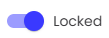
uncheck the “Locked” checkbox at the bottom and (it will change from checked to unchecked).
Click “Save” to apply the changes.